Augmented realityiPhone, iPad and Android
See where AI attacks hit, on your desk
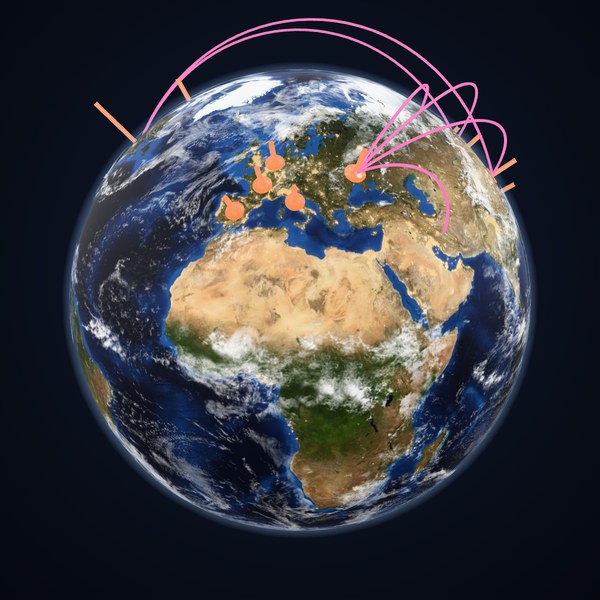
Point your phone at a table and NASA's picture of the Earth appears on it, 30 centimetres across and turning once a minute, with the incidents glowing where the sources say they hit and pink arcs from the countries a named source attributed attacks to. Walk around it, pinch to make it bigger, look underneath.
 View it in your roomView it in your room
On a computer? Point your phone's camera at the code, open the page it finds, and tap View it in your room.
In the model: the 33 incidents of the library's 128 that the sources place, in 17 countries, as orange beams as tall as their count, and 17 attributed attacks as arcs. The others hit anyone who used the software, or the sources do not say where. Made on Nov 17, 2026.
How it works
- On an iPhone or iPad it opens in AR Quick Look, built into iOS; on Android in Google's Scene Viewer. Nothing to install, and the camera picture stays on your phone.
- The beams and arcs are the same data as the globe in the Learning Center, where every incident links to its sources.
The Earth in the model
- The Earth is NASA's Blue Marble for November (NASA Earth Observatory): satellite pictures of 2004, one for each month, so the snow and the green are the month's.
- The clouds float a little above it. They are NASA's cloud composite, a typical cover and not today's weather.
- The warm lights are the cities, from NASA's Black Marble. They are faint, and show most on the side of the globe that your room leaves dim.
- The thin blue haze round the edge is the air.